
Free · runs in your browser

Overexposed video, explained

Exposure, highlights, clipping, dynamic range and HDR in plain words, with what each one means when you try to fix a clip that came out too bright.

Drop a video to darkenChoose a video to darken

Or choose one from your computer to begin.Pick the over-bright clip from your photos or files.

Works with MP4MOVWebMMKVand more

Stays on your device.

A video looks overexposed when the camera let in more light than the scene needed, so most of its tones are recorded too close to white. Some of that can be corrected afterwards and some can’t, and the difference comes down to one idea: clipping. This guide explains it, along with the other terms you meet when you try to fix a bright clip.

It is written for both beginners and people who edit for a living. If you just want the fix, open your clip in the darkening tool and press Auto fix; come back here if the result raises questions.

How to diagnose a too-bright clip

Four checks, in the order an editor would make them.

  1. Look at the brightest thing you care about

    Usually a face or the sky. If it still has texture, the clip is bright but recoverable. If it is a flat white shape, it is clipped.

  2. Look at the darkest thing in the frame

    If shadows, black clothes or a dark doorway look grey, the clip also lacks contrast. Lowering Blacks will help as much as lowering exposure.

  3. Read the histogram

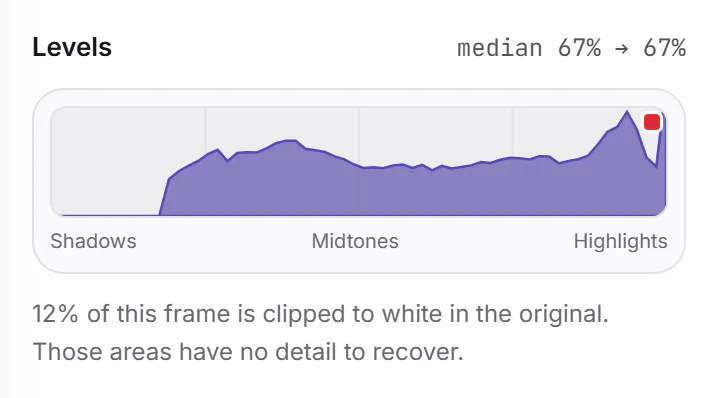
    In the tool, open More options to see Levels. A heap of pixels against the right edge is clipping; a graph that starts well right of the left edge means there are no true blacks.

    The Levels graph for an overexposed frame before any change: nothing in the left third, a broad hump through the middle and a tall spike pressed against the right edge, marked with a red clipping flag. The text below says 12% of this frame is clipped to white in the original. (enlarge image)

    An overexposed frame in Levels: no true blacks on the left, clipping on the right.

  4. Pick the fix that matches

    Bright all over: Overexposed or Exposure. Glaring sky: Blown-out sky or Highlights. Pale and milky: Blacks and Contrast. Not sure: Auto fix.

Exposure: how much light the camera let in

Exposure is the total amount of light that reaches the sensor for each frame. Three settings control it: the aperture (how wide the lens opening is), the shutter (how long each frame collects light) and the sensor gain, usually called ISO. Phones adjust all of this automatically, and they are tuned to make the average of the frame come out mid-grey.

That averaging is what catches people out. Point a phone at a person in front of a dark wall and the camera brightens everything to lift the wall towards grey, so the face burns out. Snow, beaches, white walls and stage lighting cause the opposite. Most “overexposed” clips are a camera averaging a scene that wasn’t average.

Photographers measure exposure in stops. One stop is a doubling or halving of light. The Exposure control in this tool works in stops too, so −1.0 means half the light, which is a lot: most fixes land between −0.3 and −1.0.

Highlights, midtones and shadows

Editors split the range of brightness into rough bands. Shadows are the darker third, midtones the middle (most skin, foliage and walls) and highlights the brightest part: skies, lamps, white clothing, reflections. Whites and blacks are the very ends of the range.

Each control in a grading tool is aimed at one band. In this tool, Highlights compresses the bright band, Whites sets where the very top lands, Gamma moves the midtones, and Blacks sets the bottom. Exposure scales all of them at once. Thinking in bands is the quickest route to a natural result, because over-bright footage is rarely too bright by the same amount everywhere.

Clipping: when the numbers run out

Ordinary video stores each colour channel of each pixel as a whole number from 0 to 255 (8-bit), or 0 to 1023 in 10-bit formats. When more light arrives than the top number can describe, the camera writes the top number anyway. Every pixel in a sunlit cloud, a window or a shiny forehead can end up with exactly the same value. That is clipping, and the area is “blown out”.

Clipping destroys information, not just brightness. A clipped cloud isn’t a bright cloud that can be dimmed; it is a white shape with nothing inside. Darkening it reveals no edges because the file never recorded any. This is the single most important limit on fixing overexposed video, and any tool that promises otherwise is inventing detail.

Colour can clip channel by channel. A bright blue sky often clips red and green first, then blue, so before it turns white it passes through a pale cyan. That is why recovered skies sometimes look slightly the wrong colour at their brightest edge.

Dynamic range, and where HDR fits in

Dynamic range is the span from the darkest to the brightest tone a camera, a file or a screen can hold, usually given in stops. A sunny street can span 15 stops or more; a typical phone sensor captures around 11 to 13 in one exposure; a standard (SDR) video file and screen show roughly 6 to 8 comfortably. Something has to give, and in a bright scene it is usually the highlights.

HDR (high dynamic range) video keeps more of the top end, using 10-bit values and a transfer curve such as HLG or PQ, and HDR screens can show it brighter than SDR. Most recent iPhones and many Android phones record HDR by default. On an SDR screen, or in an app that doesn’t understand HDR, those clips can look harsh or washed out, because the extra range has to be squeezed into a smaller one.

When you open an HDR clip in this tool, the browser converts it to standard range and the output is SDR. That is often an improvement for sharing: the result looks the same on every device instead of being dazzling on some and flat on others.
Darker isn’t the same as lower contrast

People often reach for the wrong slider, because brightness and contrast are easy to confuse. Brightness (or Exposure) moves the whole range up or down. Contrast sets how far apart the tones are. An overexposed clip is usually both too bright and too low in contrast, because the tones have bunched up near white.

  • Lowering brightness alone makes the picture darker but leaves it flat, and the blacks turn into a dull charcoal.
  • Lowering contrast pulls whites down but also lifts blacks, making the picture greyer, which is the opposite of what washed-out footage needs.
  • Raising contrast while lowering exposure and pulling highlights back restores depth: the clip looks darker and clearer at once.

That combination is what Auto fix and the Overexposed look aim for. If you ever find a fix looking muddy, check the darkest part of the frame: deepening Blacks usually solves it.

Why heavy fixes can show banding

An 8-bit file has 256 steps per channel. When a fix stretches a narrow band of tones across a wider one, for example the pale top of a sky, those steps get further apart and smooth gradients can show visible bands. Compression makes this worse. The cure is moderation: use the smallest correction that looks right, export at High quality, and if banding still shows in a sky, recover a little less.

Exposure and clipping: questions

What is the difference between overexposed and washed out?

Overexposed describes the cause: too much light. Washed out describes how it looks: pale, low-contrast and lacking colour. Overexposure is the most common cause of a washed-out look, but haze, flare and a wrong colour range setting can cause it too.

Can AI recover clipped highlights?

It can paint plausible clouds or texture into a clipped area, but that is invented, not recovered. The original file holds no detail there. This tool does not invent detail.

Why does my iPhone video look washed out on Windows or in some apps?

It is probably an HDR clip shown by software that doesn’t handle HDR well, so the tones are squeezed without proper tone mapping. Converting it to standard range, for example by saving a copy here, usually fixes how it looks elsewhere.

What does a stop of exposure mean?

One stop doubles or halves the light. Lowering Exposure by one stop is a large change; most overexposed clips need between a third and a whole stop.

Is it better to shoot dark and brighten later?

Slightly darker is safer than slightly brighter, because clipped highlights can’t be recovered, while shadows can be lifted. Go too dark, though, and lifting shadows brings up noise.

What is a histogram?

A graph of how many pixels have each brightness, from black on the left to white on the right. A spike against the right edge means clipping. The tool shows one under More options, called Levels.