What does “blown out” mean in video?
It means part of the picture is so bright that the camera recorded it as maximum white, or close to it. Close to it can be recovered; maximum white cannot.
Free · runs in your browser
Bring back clouds, window views and the shape of a face from footage that glares. A clipping readout tells you what is recoverable before you export.
To recover blown-out highlights, open the clip above and choose Blown-out sky. It brings the brightest tones down hardest while the midtones and shadows move much less, so a bright sky or window view gets its texture back without the rest of the scene going dark. Strength sets how far it goes, and Highlights and Whites under More options give finer control.
“Blown out” is often used for two different things. A highlight that is merely very bright still holds detail, and recovery works. A highlight that is clipped has hit the top of the scale and holds none. The Levels graph shows clipping as a bar at the right-hand edge and gives the share of the frame affected, so you know which case you have.
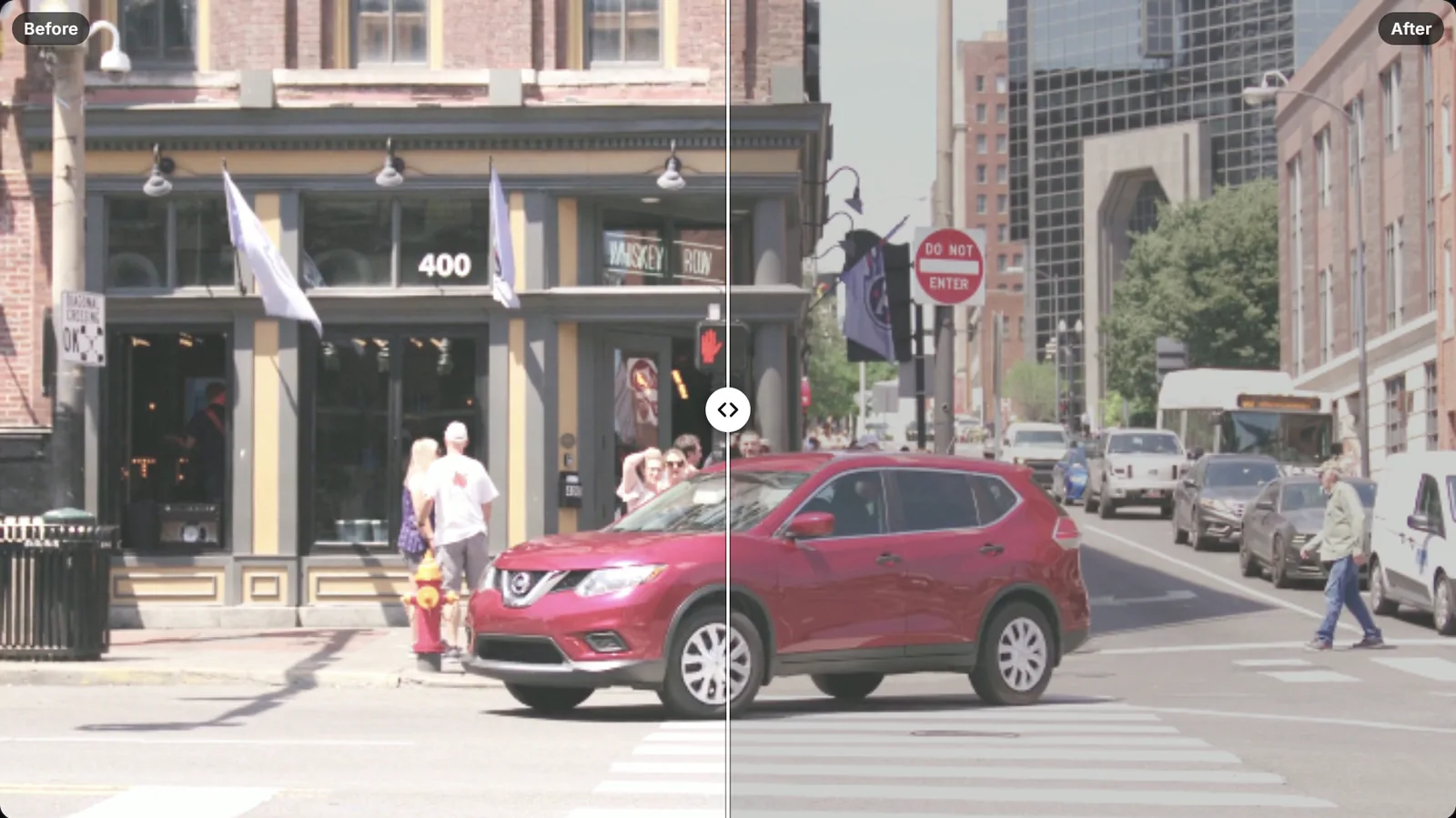 (enlarge image)
Blown-out sky at 100% Strength, compared with Split.
Pick the clip with the bright sky, window or lamp. It opens in your browser.
The look compresses the top of the range. Raise Strength until clouds or the view outside appear, and stop before they turn grey.
Open More options. Highlights works on bright tones in general; Whites sets the very top. Each slider has its own Reset button if you go too far.
Select Export video, then Download video when it’s ready.
Highlight recovery is a curve that bends only at the top. Tones below a knee point, roughly the brightness of a sunlit face, pass through almost untouched. Above the knee, each step up in the original becomes a smaller step in the result, so a range that used to fill the top tenth of the scale now fills a larger share of a darker range. Small differences that were hard to see, such as the edge of a cloud, become visible.
This is also why recovery can make a bright area look slightly flat if pushed hard: the curve has to compress something. If the sky starts to look like grey paint, ease off Strength or raise Contrast a touch.
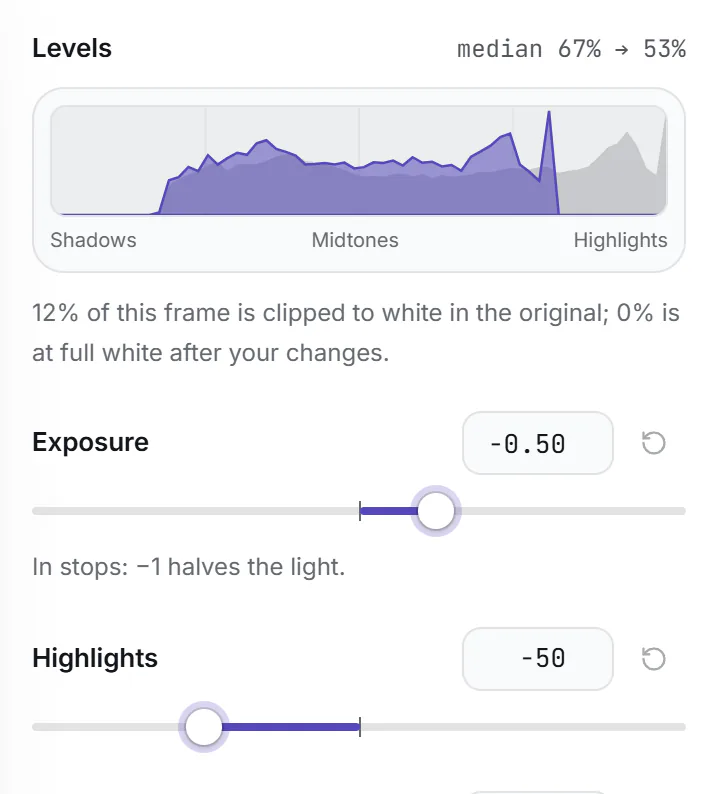
Levels is a histogram of the current frame: dark tones on the left, bright on the right, with the height showing how many pixels have each brightness. The faint outline is the original and the solid shape is the result.
The figure under the graph, such as “3% of this frame is clipped”, counts pixels at the very top of the scale in the original. Scrub through the clip to check other moments, because clipping often comes and goes as the camera moves.
 (enlarge image)
Grey is the original, purple the result. The spike at the right edge is clipping.
If a large part of the sky is clipped, no setting will put clouds back. Three choices keep the result looking deliberate: leave the clipped area white and darken only the rest (keep Highlights close to 0 and use Exposure and Gamma); trim the clip to the moments when the camera points away from the sun; or crop the sky out in another editor. A smooth grey patch where a sky should be is what draws attention, so avoid that.
For the wider picture of why this happens and how cameras handle it, read overexposed video explained.
It means part of the picture is so bright that the camera recorded it as maximum white, or close to it. Close to it can be recovered; maximum white cannot.
The sky was clipped in all three colour channels, so the file stores it as white with no colour information. Darkening white gives grey. Move Highlights back towards 0 so it stays white, or accept the grey.
No. Exposure lowers everything, which also darkens faces and shadows. Highlight recovery mainly affects the brightest tones and leaves the rest of the picture close to where it was.
If the view outside is bright but not clipped, yes: choose Blown-out sky and the trees or buildings come back. If the window is pure white, it stays white.
HDR clips often hold more highlight range than they appear to, and converting them to standard range here keeps much of it, so recovery often works better on HDR phone footage than on older clips.